To sell unstitched fabric online, show the real fabric first, then a clearly labelled stitched preview of how it could look as a finished kurta, shalwar kameez or suit, then close-ups of the print, border and embroidery. Buyers struggle to picture flat cloth as an outfit; the preview closes that gap, and the honest label keeps their trust.
This post is for lawn brands, cloth houses and home sellers working on Instagram, WhatsApp, Daraz, Shopify or their own site. Most of it applies whether or not you use AI.
Why is unstitched fabric hard to sell online?
A buyer in a shop can hold the cloth against herself, feel the weight and ask the shopkeeper how it will look stitched. Online she gets a photo of a folded shirt piece, a dupatta and a trouser cut. Three problems follow.
Print placement is invisible. A large motif can land on the chest, the hip or the hem. A folded photo does not tell her which. Borders and daaman work are hidden. The border that makes the suit special is often tucked into the fold. Fabric pieces don't look like an outfit. A contrast dupatta beside a printed shirt piece reads as two loose pieces, not a matching set.
Brands with a studio solve this by stitching a sample and doing a photoshoot for every article. That is the standard look of a big lawn launch. Smaller sellers often can't afford to stitch every design, so they post fabric-only photos and lose the buyers who need to see the outfit.
How to build a listing that sells
- 1
Photograph the real fabric properly
Flat, pressed, in indirect daylight, from directly above, with at least one full repeat of the print. This photo is your proof of what the buyer gets, and it is also what an AI preview is built from. Our fabric photo guide has the full checklist.
- 2
Add a stitched preview of one or two styles
Show the fabric as a finished garment: a straight kurta with trousers, a shalwar kameez, or a frock style for a festive print. Pick styles your customers actually wear, not the most dramatic one.
- 3
Show close-ups of the details
Embroidery, border, daaman, sleeve patch and dupatta pallu each get their own photo. AI previews approximate fine embroidery, so these real close-ups matter.
- 4
Write what is in the box
Shirt length, dupatta length, trouser length, fabric composition, and whether embroidery is on the shirt front only or on sleeves too. Say clearly that the suit is unstitched.
- 5
Label the preview
Put "Stitched preview, AI-generated. You receive unstitched fabric." on or under the image. One honest sentence prevents most returns and complaints about stitching that was never included.
From fabric to preview
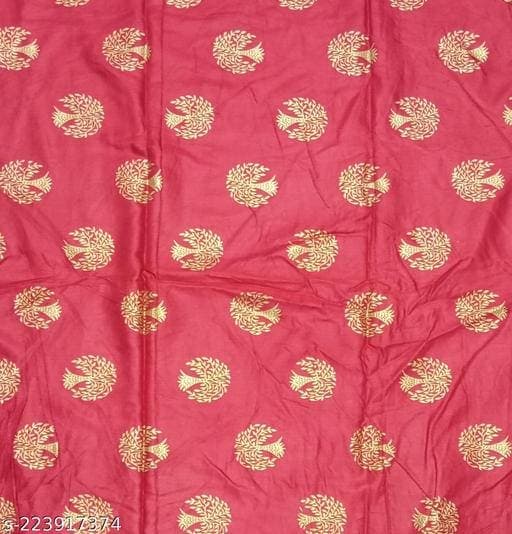 Fabric
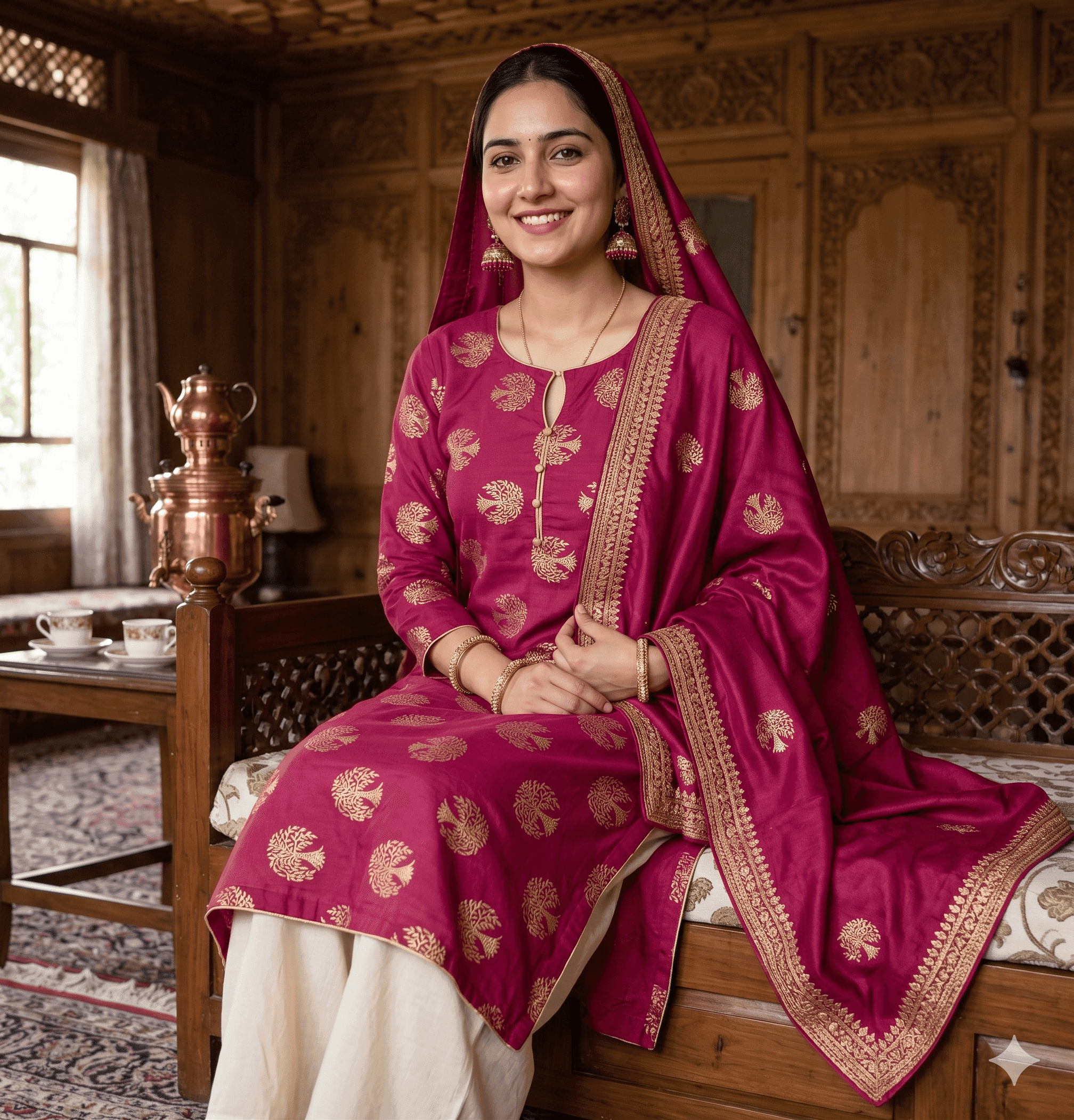 Preloom output
What to post on each channel
| Channel | What works | Watch out for |
|---|---|---|
| A carousel: stitched preview first to stop the scroll, then the real fabric, then detail close-ups | Meta may add an "AI info" label to AI-generated images it detects; say it is a preview in the caption anyway | |
| Send the preview and the real fabric photo together, so the buyer forwards both to family | Previews forwarded alone lose their caption, so put the label on the image itself | |
| Daraz and other marketplaces | Real fabric as the main image; previews further back in the gallery | Check the marketplace's current image rules in its seller centre before uploading |
| Shopify or your own site | Real fabric photo plus one or two previews per product, with the label in the description | If you run Google Shopping ads, AI images must keep their AI metadata |
What do the platforms say about AI images?
Google Shopping. Google's Merchant Center image rules say that all images created with generative AI must contain metadata showing they were AI-generated, such as the IPTC DigitalSourceType tag, and that you must not strip it. The same page says the primary image must clearly display the exact item being sold. For an unstitched suit, that is a strong reason to make the real fabric the main image and use previews as additional images.
Instagram and Facebook. Meta says it adds an "AI info" label when it detects industry-standard AI signals in an image or when the person posting discloses it. You do not lose anything by saying it yourself first: a buyer who learns the photo is AI from a label, after assuming it was a real stitched suit, trusts you less.
Marketplaces such as Daraz. Rules change and differ by category. Read the image guidelines in your seller centre before using previews, and when in doubt keep the real product photo as the main image.
Making previews at catalogue scale
A lawn collection can run to dozens of articles, each in a few colourways. Stitching a sample for every one is what makes small sellers fall back to fabric-only photos. With Preloom you save each fabric to a library once, then use a batch grid to preview up to 12 fabrics in up to 12 styles in one run, up to 60 designs. Each design costs 1–4 credits depending on the model tier and quality.
On the Professional and Enterprise plans you can also place a preview on a photoreal AI model, which suits Instagram better than a garment on its own. Our guide to AI model photos for clothing covers that step. For a seller-focused overview, see the fabric sellers page.
If you also sell to boutiques or wholesale buyers, a collection share link lets them approve or comment on each design without an account. That is often how a seller learns which fabrics to reorder before the season ends.